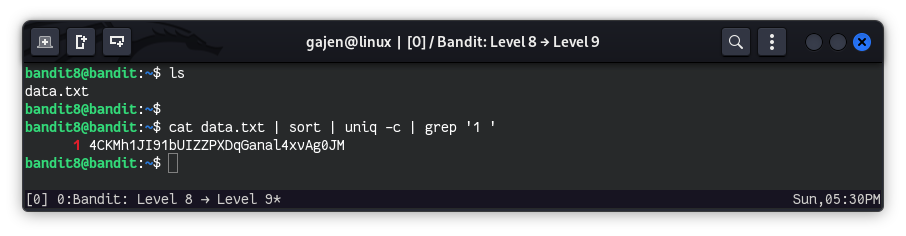
The password for the next level is stored in the file data.txt and is the only line of text that occurs only once.
Here are the details which we have from the previous level:
- Host:
bandit.labs.overthewire.org - Port:
2220 - Username:
bandit8 - Password:
dfwvzFQi4mU0wfNbFOe9RoWskMLg7eEc
So, The SSH syntax will be:
sshpass -p dfwvzFQi4mU0wfNbFOe9RoWskMLg7eEc ssh [email protected] -p 2220
As we know from the hint, the password for the next level is stored in the file data.txt and is the only line of text that appears exactly once. So, Let’s begin to find it:
cat data.txt | sort | uniq -c | grep '1 '
cat data.txt: Outputs the contents ofdata.txt.sort: Arranges the output alphabetically.uniq -c: Counts and displays each unique line, indicating how many times it appears.grep '1 ': Filters the output to show lines that appear only once.