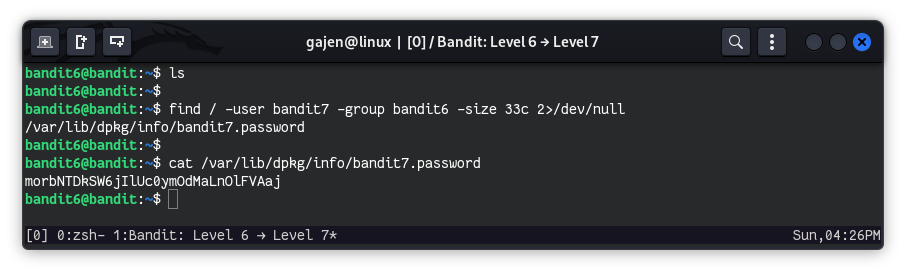
The password for the next level is stored somewhere on the server and has all of the following properties:
- owned by user bandit7
- owned by group bandit6
- 33 bytes in size
Here are the details which we have from the previous level:
- Host:
bandit.labs.overthewire.org - Port:
2220 - Username:
bandit6 - Password:
HWasnPhtq9AVKe0dmk45nxy20cvUa6EG
So, The SSH syntax will be:
sshpass -p HWasnPhtq9AVKe0dmk45nxy20cvUa6EG ssh [email protected] -p 2220
To find the password file for the next level, which has the following properties: owned by user bandit7, owned by group bandit6, and 33 bytes in size, we can use the find command with specific criteria:
find / -user bandit7 -group bandit6 -size 33c 2>/dev/null
find /: Means to look files in root (/) directory recursively.-user bandit7: Filters files owned by userbandit7.-group bandit6: Filters files owned by groupbandit6.-size 33c: Filters for files exactly 33 bytes in size.2>/dev/null: Redirects any error messages (such as permission denied) to/dev/null, for clear output.