

There is a git repository at ssh://bandit30-git@localhost/home/bandit30-git/repo via the port 2220. The password for the user bandit30-git is the same as for the user bandit30.
Here are the details which we have from the previous level:
- Host:
bandit.labs.overthewire.org - Port:
2220 - Username:
bandit30 - Password:
qp30ex3VLz5MDG1n91YowTv4Q8l7CDZL
This level is similar like previous level, we are again dealing with a git repository located at ssh://bandit30-git@localhost/home/bandit30-git/repo via port 2220. The password for the user bandit30-git is the same as for the user bandit30. Let’s construct the command to clone the repository to our system.
The repository is hosted on the localhost of the server, So the server address for us will be bandit.labs.overthewire.org instead of localhost in our command.
git clone ssh://[email protected]:2220/home/bandit30-git/repo
This will prompt for the password because the repository is password-protected. We need to enter the password of bandit30 because The password for the user bandit30-git is the same as bandit30.
Explore the Repository
After cloning the repository, navigate into it and list its contents.
cd repo
ls -a
# Output:
# .git  README.md
Checking the README.md File
Read the README.md file to see if it contains the password.
cat README.md
# Output:
# just an epmty file... muahaha
Inspecting the Commit History
Use the git log command to view the commit history along with the changes made in each commit.
git log
# Output:
# commit 49ebc0513539a56d3626f3121ff4e72585064047 (HEAD -> master, origin/master, origin/HEAD)
# Author: Ben Dover <[email protected]>
# Date:   Thu Jun 20 04:07:17 2024 +0000
#
#     initial commit of README.md
Checking the .git Folder
The .git folder contains configurations and metadata of the repository. Let’s inspect it.
cd .git
cat packed-refs
# Output:
# # pack-refs with: peeled fully-peeled sorted
# 49ebc0513539a56d3626f3121ff4e72585064047 refs/remotes/origin/master
# 84368f3a7ee06ac993ed579e34b8bd144afad351 refs/tags/secret
The packed-refs file shows a tag named secret. We can use git cat-file to see the contents of the file the tag refers to.
Using git cat-file
The git cat-file command is used to view the contents of Git objects.
git cat-file -p 84368f3a7ee06ac993ed579e34b8bd144afad351
# Output:
# fb5S2xb7bRyFmAvQYQGEqsbhVyJqhnDy
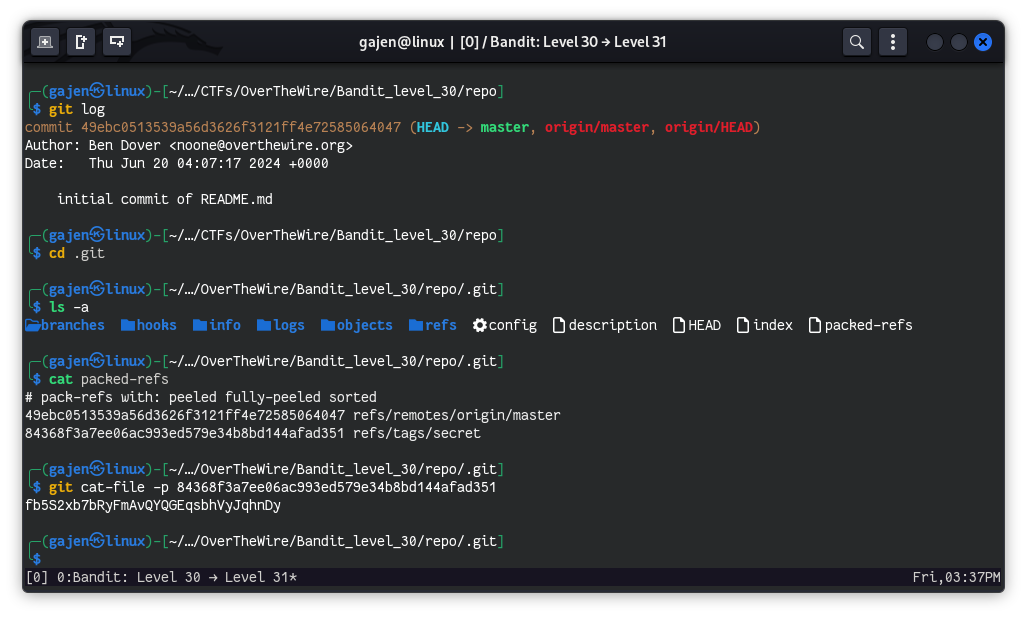
The password for the next level is fb5S2xb7bRyFmAvQYQGEqsbhVyJqhnDy.