Good job getting a shell! Now hurry and grab the password for bandit27!
Here are the details which we have from the previous level:
- Host:
bandit.labs.overthewire.org - Port:
2220 - Username:
bandit26 - Password:
s0773xxkk0MXfdqOfPRVr9L3jJBUOgCZ
So, The SSH syntax will be:
sshpass -p s0773xxkk0MXfdqOfPRVr9L3jJBUOgCZ ssh [email protected] -p 2220
In this level, we must get a shell through Bandit: Level 25 => Level 26 level. After gaining access to the bandit26 user shell, we find a SUID binary in the home directory. This looks kind of familiar, right? In fact, it’s the same challenge as Bandit: Level 19 => Level 20.
We are again dealing with a SUID binary. SUID or setuid, is a special type of permission in Unix-like operating systems that allows users to execute a file with the permissions of the file’s owner rather than their own permissions. This special permission bit (s in the permission string) can be set on executable files using the chmod command.
ls -l
# Output:
# total 16
# -rwsr-x--- 1 bandit27 bandit26 14880 Jun 20 04:07 bandit27-do
# -rw-r----- 1 bandit26 bandit26   258 Jun 20 04:07 text.txt
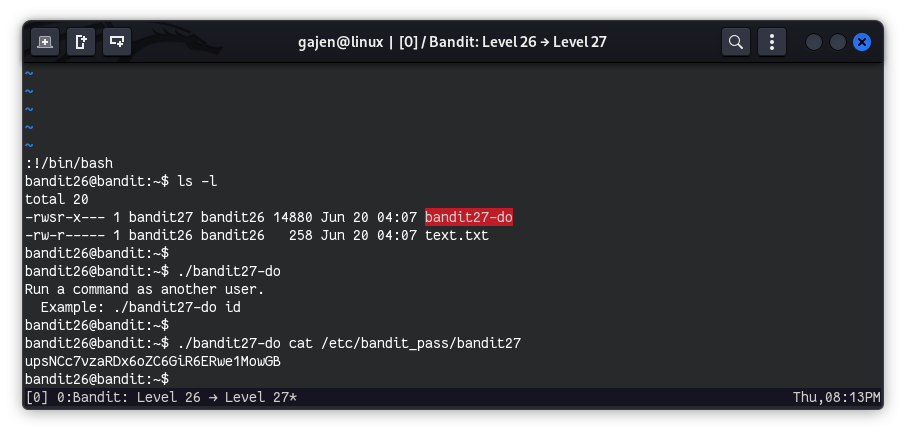
The file bandit27-do is owned by user bandit27. Therefore, when it gets executed by any user, it runs with the privileges of the bandit27 user. This provides us with an opportunity to achieve our objective by executing commands as the bandit27 user.
./bandit27-do
# Output:
# Run a command as another user.
# Example: ./bandit27-do id
This binary is designed to execute commands. Hence, we can directly use it to read files accessible to its owner.
./bandit27-do cat /etc/bandit_pass/bandit27
# Output:
# upsNCc7vzaRDx6oZC6GiR6ERwe1MowGB