A program is running automatically at regular intervals from cron, the time-based job scheduler. Look in /etc/cron.d/ for the configuration and see what command is being executed.
Here are the details which we have from the previous level:
- Host:
bandit.labs.overthewire.org - Port:
2220 - Username:
bandit22 - Password:
tRae0UfB9v0UzbCdn9cY0gQnds9GF58Q
So, The SSH syntax will be:
sshpass -p tRae0UfB9v0UzbCdn9cY0gQnds9GF58Q ssh [email protected] -p 2220
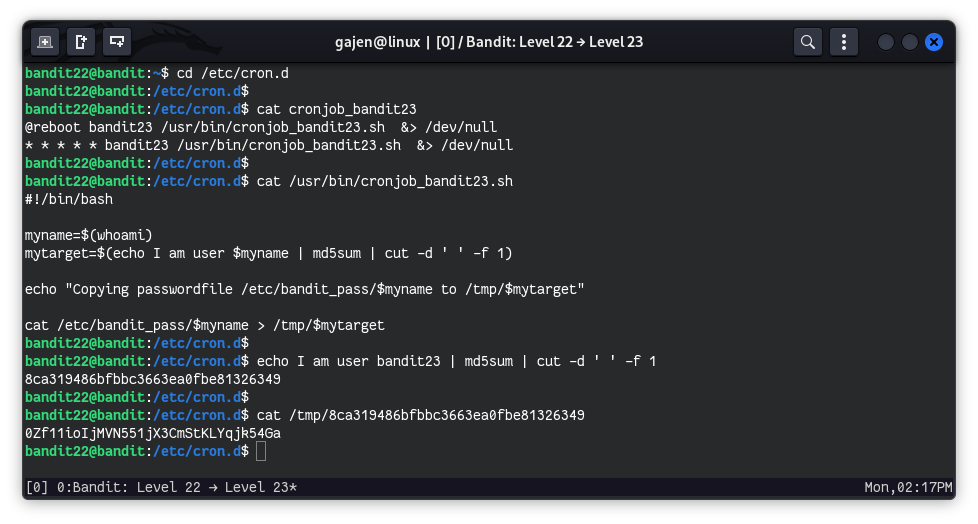
The cron jobs are usually stored in /etc/cron.d. We start by navigating to this directory.
cd /etc/cron.d
ls
# Output:
# cronjob_bandit22  cronjob_bandit23  cronjob_bandit24  e2scrub_all  otw-tmp-dir  sysstat
Among these files, cronjob_bandit23 is interesting since it suggests a cron job for bandit23.
View the contents of cronjob_bandit23 to understand what commands are being executed by this cron job.
cat cronjob_bandit23
# Output:
# @reboot bandit23 /usr/bin/cronjob_bandit23.sh &> /dev/null
# * * * * * bandit23 /usr/bin/cronjob_bandit23.sh &> /dev/null
The file config means that cronjob_bandit23.sh is executed by the bandit23 user every minute.
View the contents of /usr/bin/cronjob_bandit23.sh to see what it does.
cat /usr/bin/cronjob_bandit23.sh
{% code lineNumbers=“true” %}
#!/bin/bash

myname=$(whoami)
mytarget=$(echo I am user $myname | md5sum | cut -d ' ' -f 1)

echo "Copying passwordfile /etc/bandit_pass/$myname to /tmp/$mytarget"

cat /etc/bandit_pass/$myname > /tmp/$mytarget
{% endcode %}
The script captures the username of the user executing it and stores it in the myname variable. It then generates an MD5 hash of the string “I am user ${myname}” and stores the hash in the mytarget variable. The script proceeds to copy the user’s password to a file in the /tmp directory named with the generated MD5 hash.
So, this script is executed by the bandit23 user every minute, it means that the password for bandit23 is stored in the /tmp directory with the filename corresponding to the MD5 hash of the string “I am user bandit23”. To advance to the next level, we need to retrieve this password from the /tmp directory.
Since this script is executed every minute by bandit23, we can reverse the process to retrieve the bandit23 user’s password:
echo I am user bandit23 | md5sum | cut -d ' ' -f 1
# Output: 8ca319486bfbbc3663ea0fbe81326349
Now, we can read the file in /tmp to get the password for bandit23:
cat /tmp/8ca319486bfbbc3663ea0fbe81326349
# Output: 0Zf11ioIjMVN551jX3CmStKLYqjk54Ga