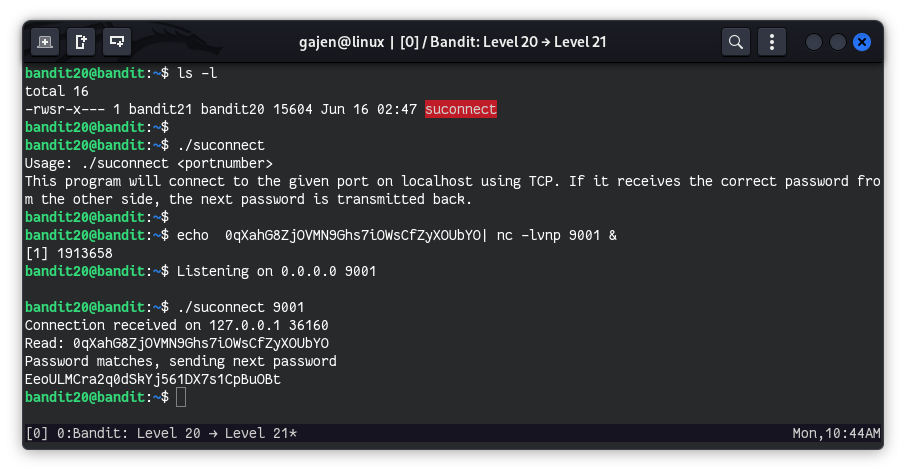
There is a setuid binary in the homedirectory that does the following: it makes a connection to localhost on the port you specify as a commandline argument. It then reads a line of text from the connection and compares it to the password in the previous level bandit20. If the password is correct, it will transmit the password for the next level bandit21.
NOTE: Try connecting to your own network daemon to see if it works as you think
Here are the details which we have from the previous level:
- Host:
bandit.labs.overthewire.org - Port:
2220 - Username:
bandit20 - Password:
0qXahG8ZjOVMN9Ghs7iOWsCfZyXOUbYO
So, The SSH syntax will be:
sshpass -p 0qXahG8ZjOVMN9Ghs7iOWsCfZyXOUbYO ssh [email protected] -p 2220
As we know from the question, there is a setuid binary is in the home directory. A setuid binary allows users to execute the file with the permissions of the file’s owner rather than their own permissions. In this case, the binary is owned by bandit21, and its functionality is to connect to any port specified by the user, compare the received password to the one for the previous level bandit20. If the password is correct, it will transmit the password for the next level bandit21.
ls -l
# Output:
# total 16
# -rwsr-x--- 1 bandit21 bandit20 15604 Jun 16 02:47 suconnect
Checking the functionality of the suconnect binary:
./suconnect
# Output:
# Usage: ./suconnect <portnumber>
# This program will connect to the given port on localhost using TCP. If it receives the correct password from the other side, the next password is transmitted back.
It is clear that we need to specify a port as an first argument in suconnect, and if the correct password of current user bandit20 is received, it will return the bandit21 user password. So, we need to start listening via ncat with the bandit20 password.
echo 0qXahG8ZjOVMN9Ghs7iOWsCfZyXOUbYO | nc -lnvp 9001 &
Now, it’s time to utilize the suconnect SUID binary:
./suconnect 9001
# Output:
# Connection received on 127.0.0.1 36012
# Read: 0qXahG8ZjOVMN9Ghs7iOWsCfZyXOUbYO
# Password matches, sending next password
# EeoULMCra2q0dSkYj561DX7s1CpBuOBt
By using the suconnect binary and providing the correct password through ncat, we successfully retrieved the password for bandit21.