The password for the next level can be retrieved by submitting the password of the current level to port 30001 on localhost using SSL encryption.
Here are the details which we have from the previous level:
- Host:
bandit.labs.overthewire.org - Port:
2220 - Username:
bandit15 - Password:
8xCjnmgoKbGLhHFAZlGE5Tmu4M2tKJQo
So, The SSH syntax will be:
sshpass -p 8xCjnmgoKbGLhHFAZlGE5Tmu4M2tKJQo ssh [email protected] -p 2220
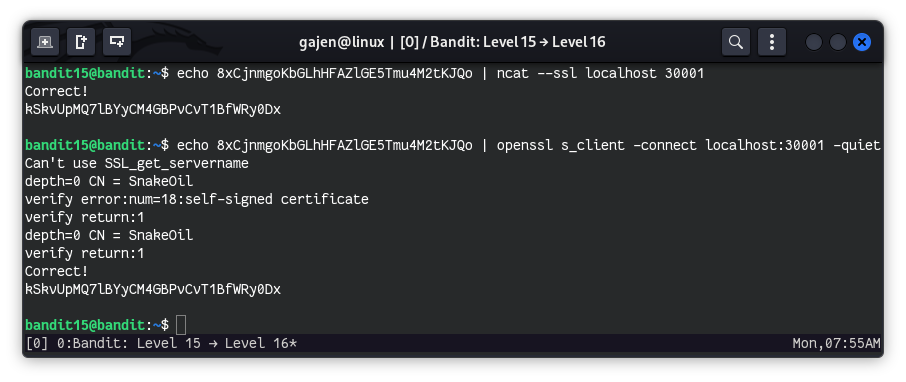
The challenge is to submit the bandit15 password to port 30001 on localhost using SSL encryption. We can do this using either ncat with SSL support or directly using openssl.
Method 1: Using ncat with SSL
Using
ncatwith SSL:echo 8xCjnmgoKbGLhHFAZlGE5Tmu4M2tKJQo | ncat --ssl localhost 30001
echo 8xCjnmgoKbGLhHFAZlGE5Tmu4M2tKJQo: This command prints thebandit15password.|: The pipe operator redirects the output of theechocommand to the next command.ncat --ssl localhost 30001: This command usesncatto connect to port 30001 on localhost with SSL encryption and return the password.
Method 2: Using openssl Directly
Using
opensslto Connect:echo 8xCjnmgoKbGLhHFAZlGE5Tmu4M2tKJQo | openssl s_client -connect localhost:30001 -quiet
echo 8xCjnmgoKbGLhHFAZlGE5Tmu4M2tKJQo: This command prints thebandit15password.|: The pipe operator redirects the output of theechocommand to the next command.openssl s_client -connect localhost:30001 -quiet: This command usesopensslto establish an SSL connection to port 30001 on localhost and sends the password. The-quietoption suppresses the verbose output.