The password for the next level can be retrieved by submitting the password of the current level to port 30000 on localhost.
Here are the details which we have from the previous level:
- Host:
bandit.labs.overthewire.org - Port:
2220 - Username:
bandit14 - private SSH key file:
sshkey.private
So, The SSH syntax will be:
ssh -i sshkey.private [email protected] -p 2220
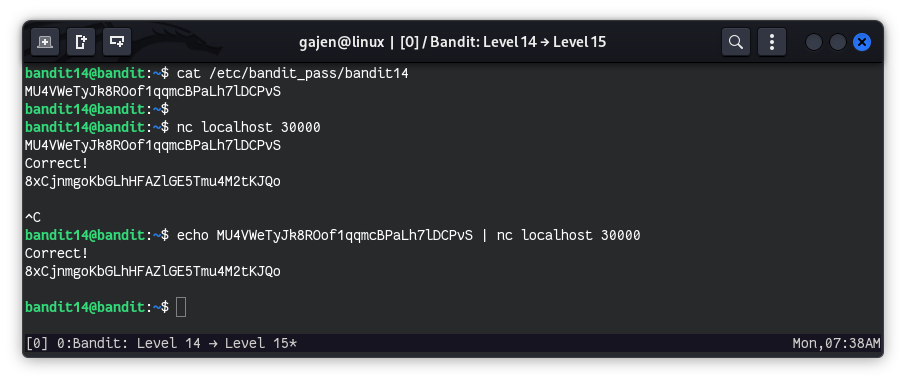
From the previous bandit13 level challenges, we know that bandit14 has access to the file /etc/bandit_pass/bandit14. We need to read this file to obtain the bandit14 password, which is necessary for completing the next step.
cat /etc/bandit_pass/bandit14
# Output: MU4VWeTyJk8ROof1qqmcBPaLh7lDCPvS
Now that we have the bandit14 password, we can use it to log in. While it’s possible to log in using the password directly, it’s not necessary for this task. But, We can also connect with SSH from creds:
sshpass -p MU4VWeTyJk8ROof1qqmcBPaLh7lDCPvS ssh [email protected] -p 2220
Now, let’s begin the challenges
To proceed, we need to submit the bandit14 password to the localhost on port 30000 to retrieve the next level password:
nc localhost 30000
This command connects to port 30000 on localhost. When we paste and enter the current level’s password, it will return the next level’s password. Use the following command to automate this:
OR,
echo MU4VWeTyJk8ROof1qqmcBPaLh7lDCPvS | nc localhost 30000
This will send the bandit14 password to port 30000 and return the password for the next level.