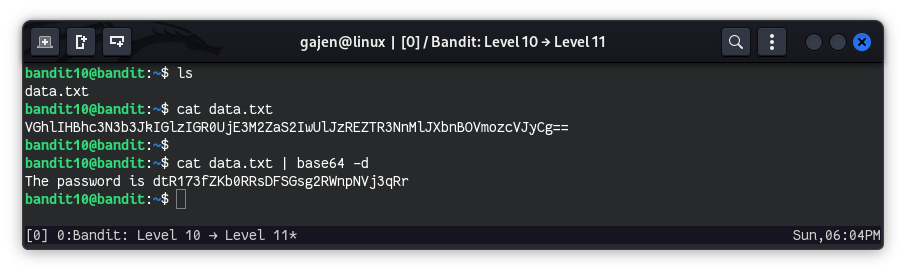
The password for the next level is stored in the file data.txt, which contains base64 encoded data.
Here are the details which we have from the previous level:
- Host:
bandit.labs.overthewire.org - Port:
2220 - Username:
bandit10 - Password:
FGUW5ilLVJrxX9kMYMmlN4MgbpfMiqey
So, The SSH syntax will be:
sshpass -p FGUW5ilLVJrxX9kMYMmlN4MgbpfMiqey ssh [email protected] -p 2220
As we know from the hint, the password for the next level is stored in the file data.txt, which contains base64 encoded data. Base64 is a type of cipher text where the original text is transformed into another form using a specific encoding scheme to hide the original message.
To retrieve the password, we need to decode the base64 encoded data.
cat data.txt | base64 -d
cat data.txt: Outputs the contents ofdata.txt.base64 -d: Decodes the base64 encoded string back into its original form.
The pipe (|) symbol is used to pass the output of one command as standard input to the next command. In the above example, the output of cat data.txt is passed to base64 -d as standard input, and base64 -d decodes the base64 cipher text.